Key Takeaways
- Optimize workflows to save credits. To refine visual details, generate low-cost static image proofs (2–4 credits) before converting them into high-res video assets (30–90 credits).
- Utilize Conversational Interfaces to leverage aggregated AI models. Using built-in conversational tools such as Supercomputer, Higgsfield streamlines prompt execution without complex menus.
- Create pattern-breaking visual hooks with AI video. Instead of replacing authentic human storytelling, use custom avatars and high-end visual concepts in the first three seconds of the reel or carousel.
Recently, I spent 30 days learning what might be the world’s most powerful AI video tool. Some of what I created blew my mind, and some was a complete train wreck.
Thankfully, after dozens of hours in Higgsfield, I finally know who should use it, who should avoid it, and whether it’s worth the hype.
As a creator, I don’t care how many features tech companies list on their homepage. All I care about is this: can a regular creator open the software, figure out how it works, and build something worth publishing that grows their business?
When Higgsfield reached out about sponsoring a video, I told them: “I’m not doing a standard, fluff-filled tour where I click around and tell everyone it’s revolutionary. I need to make mistakes, burn through credits, make terrible videos, figure out what I’m doing wrong, and find out what this software is capable of.”
Here’s what I learned after a month of testing.
My First Reaction: Overwhelmed
I wish I could tell you that I started creating Hollywood-quality content on Day 1. My actual reaction was closer to: What the hell is this?
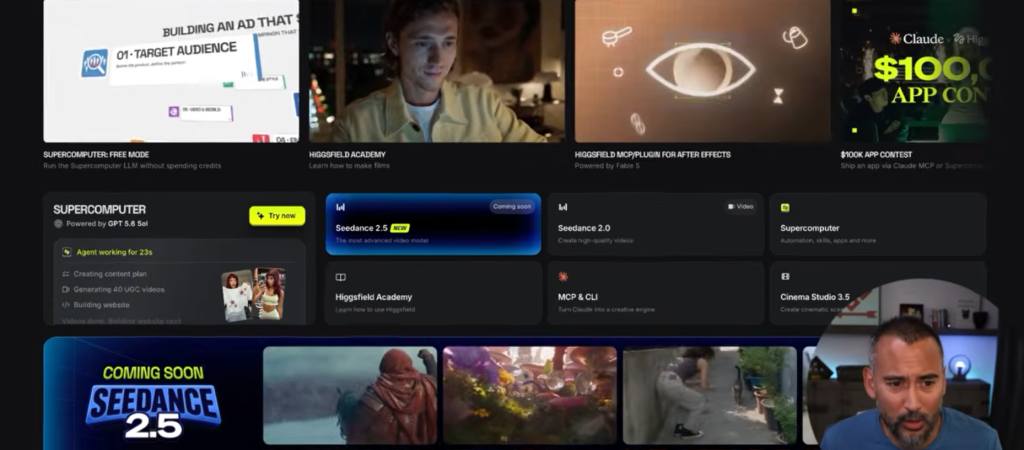
The dashboard offers a wide range of motion graphics, image tools, video generators, and voice models. The worst part is that you won’t be dealing with just one AI model. Higgsfield aggregates several underlying engines (such as Kling, Seed Dance, Gemini, and Grok Imagine).
So trying to figure it all out at once will only lead to frustration.
That’s when I found the ultimate cheat code inside the app: Supercomputer.
Supercomputer is Higgsfield’s conversational interface. Think of it as a hybrid of ChatGPT and Claude, natively wired for media production. Rather than navigating complex dropdown menus, you just open a chat dialogue and tell the AI what you want.
The Credit-Burning Mistake I Made Early On
At first, I struggled to recreate viral video styles like those dynamic, cinematic street-walking clips on Instagram.
When I uploaded a screenshot or reference shot, the video generator produced garbage. The background moved a lot, the text was garbled, and my credits were disappearing fast.
My secret workflow became clear to me — and yours will be too: Always create the proof image first.
First, ask the AI to generate a static image proof instead of generating a full video from scratch (which costs a lot of credits).
- Generating an image proof costs roughly 2 to 4 credits.
- Generating a full video directly can cost 30 to 90 credits depending on the resolution and duration.
After the static proof looks 90% accurate, hit the “Turn to Video” button and apply your motion prompts. By adjusting one workflow, I saved hundreds of credits and many hours of frustration.
Turning Static Content Into High-Engagement Video
For me, Higgsfield excelled at upgrading content formats that already work.
From a viral slide carousel on my Instagram account, which already had nearly 30,000 likes, I turned it into a split-screen AI video carousel.
- Attempt #1: After uploading my face, I asked for motion. I got a weird puppet version of myself moaning gibberish back from the AI.
- Attempt #2: Despite explicitly requesting: “No talking, only movement in top and bottom frames,” the mouth continued to move.
- Attempt #3: It hit the sweet spot after the third refinement.
On the top frame, I appeared in a moving video, and on the bottom frame, a moving historical picture appeared. With such crisp and lifelike quality, the carousel felt completely different.
The Real Power: Custom Avatar Continuity

When you’re a content creator or personal brand, standing out is everything. Using Higgsfield, you can create persistent avatars of yourself by uploading reference headshots.
By mapping your face, you can prompt yourself into virtually any situation:
- Standing in front of the Eiffel Tower looking like Neo from The Matrix.
- Dressed in a suit as a corporate executive at Meta.
- Rendered as a jacked WWE wrestler holding up a championship belt.
- Floating through space as an astronaut.
With the astronaut image, I tested the video rendering limits with the prompt: “Walking in a spacesuit, low-gravity bouncing, ending with a thumbs-up to the camera.”
I rendered it in 4K. The result was unreal. The subtle floating physics, the visor reflection, and the natural body movement made the scene look like a high-end commercial.
Is Higgsfield Worth It?
Who should AVOID it? If you’re a brand-new creator who is still on the hunt for your niche, figuring out how to structure a script, or understanding what your audience wants, skip this. As you start building content, you will get distracted by the sheer number of tools available.
Who should USE it? It’s a game changer for those who already have an audience, know their niche, and want to dominate the feed visually.
How I’m using it going forward. I’m not using AI to fake reality or pretend to be actually on Mars. I use these visual hooks to capture attention in the first 3 seconds of a reel or carousel, then deliver value in the captions and audio.
The goal is to disrupt patterns. Whenever we scroll through a sea of boring talking-head videos, a hyper-realistic, dynamic AI visual catches our attention.
Image Credit: Jeff Rose Learning Higgsfield